
How to Use eBird: Recording Birds and Understanding Your Local Patch
By Mark Hunt
For me, eBird is an essential part of my birding equipment. eBird provides a method to keep an accurate record of your birding, how long you spent and what you saw. You can also look through other birders’ records before a visit, helping you to understand what species you can expect to see at the time of year and what has been recently seen. Best of all, it’s free to use. [1]
For a local patch, your records become more useful as they grow. You can look back over previous visits to see when you first heard a Chiffchaff in spring, whether winter thrushes stayed for several weeks, or what you found on the same walk last year. The details recorded in each visit add up to a record of the birdlife and its changes over the years. Your records become part of the scientific record that guides long-term conservation efforts.
Record your visit
You can start a checklist in eBird Mobile either while you’re out, or enter the details on the website afterwards. Alongside the birds, you can record the location, date and type of visit. Timed counts include the duration; travelling checklists also record the distance covered. [1]
My Snettisham checklist from 29 June has 30 species from a 3.53-kilometre walk lasting two hours and 21 minutes. The route is there too. Wood pigeons and Moorhens appear alongside Avocets and Shelducks, so I can return to a complete record of the visit rather than just the birds I was most pleased to see.
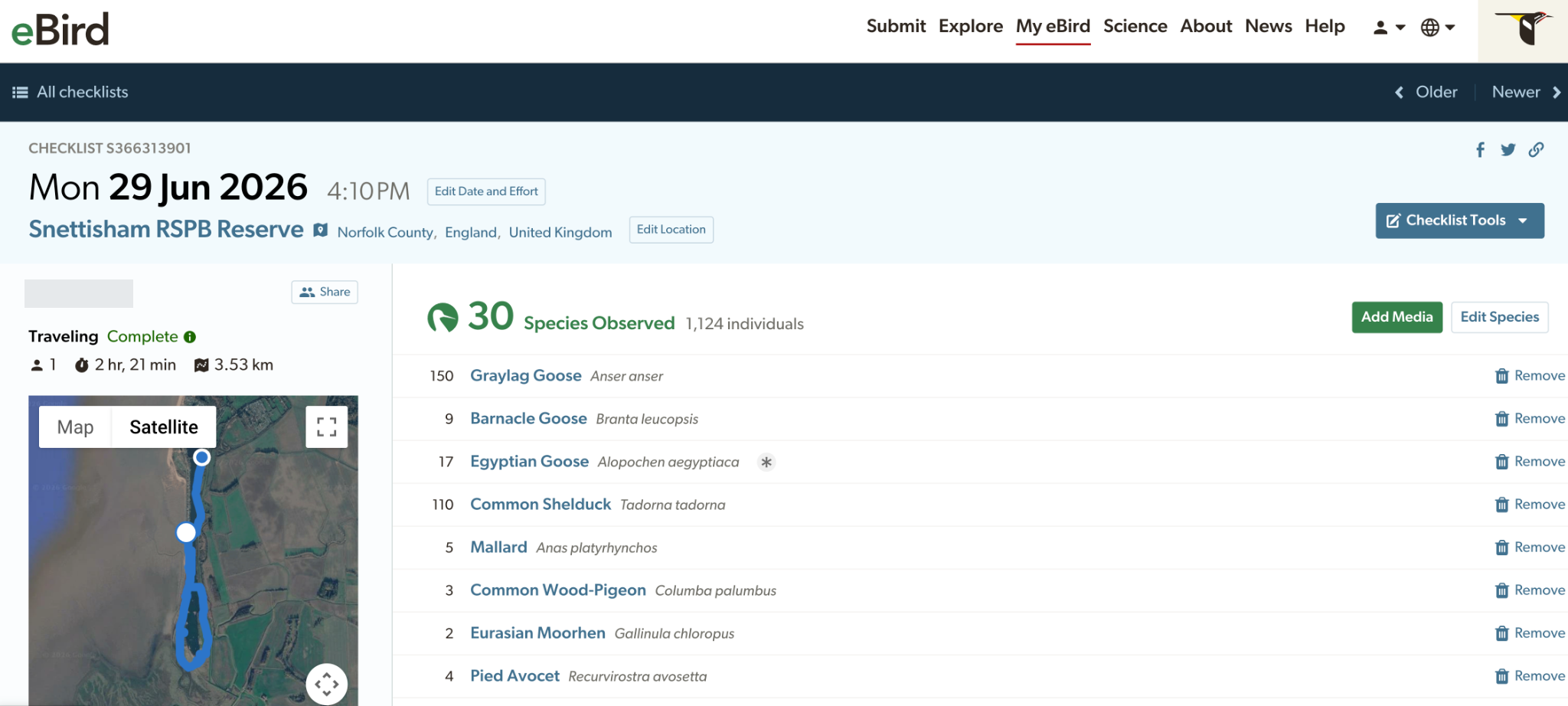
Snettisham, 29 June: 30 species, with the route, time and distance recorded.
When eBird asks whether a checklist is complete, it means you were birding and have included every species you identified by sight or sound. It doesn’t mean you found every bird present or identified every call. Leaving out the Woodpigeons because they seemed unremarkable would make the list incomplete. [2]
Complete lists matter because they help researchers interpret what wasn’t reported as well as what was. A missing species means more on a list from someone recording all the birds they identified than on a list containing only the highlights. Cornell uses complete checklists in its Status and Trends work and other research. [2]
Using Merlin with eBird
Merlin and eBird share your Cornell Lab account. Birds recorded in eBird appear in your Merlin life list, and eBird records help Merlin suggest species likely in the area. Saving a bird only in Merlin, though, keeps it as a personal sighting. It won’t appear on public eBird maps or Alerts, or contribute to Status and Trends. [9, 11]
You can also export a sound recording from Merlin and attach it to your checklist as supporting evidence. You must do this manually; the recording doesn’t transfer automatically. Our Merlin Sound ID article explains how to assess a suggestion before accepting the identification. [10]
Keeping records for your patch
Your patch might take in a stretch of river, a wood and several fields, each recorded as a separate location. eBird’s Patch Lists let you bring selected personal locations and hotspots together in one list. If you start recording at another location within the patch, you’ll need to add it to that group. [3]
Keep enough detail to answer the questions that interest you. A long checklist might tell you that a species was somewhere along a three-mile walk. A note saying it was calling from the riverside scrub makes that record much more useful when you return.
The route and time spent watching also matter when comparing visits. An early start or an extra hour in the wood could explain a longer list. Following a similar route for a similar length of time makes comparison easier, while notes on weather and habitat changes can help explain differences.
Sound recordings can add detail to these visits. Our BirdNET Live patch-survey article looks at that approach, including the need to check automated identifications before reporting them.
What the maps and charts tell you
A hotspot page brings together records from a shared birding location. A regional page, such as Norfolk, covers a wider area. Start with recent checklists to see what people have found, then use the bar charts to look at the usual seasonal pattern. [4, 5]
The charts show how often a species appears on complete checklists. If the figure is 40 per cent, that means it was reported on 40 out of every 100 relevant lists. It isn’t a count of birds, and it doesn’t give you a precise chance of seeing one on your next visit. Habitat matters: a species reported regularly on the Norfolk coast may be unlikely in an inland wood. [5]
Species pages provide identification information, photographs, sounds and maps. The Curlew page below brings these together with regional records. In the screenshot below, darker purple squares show where Curlews were reported on a higher proportion of complete checklists.
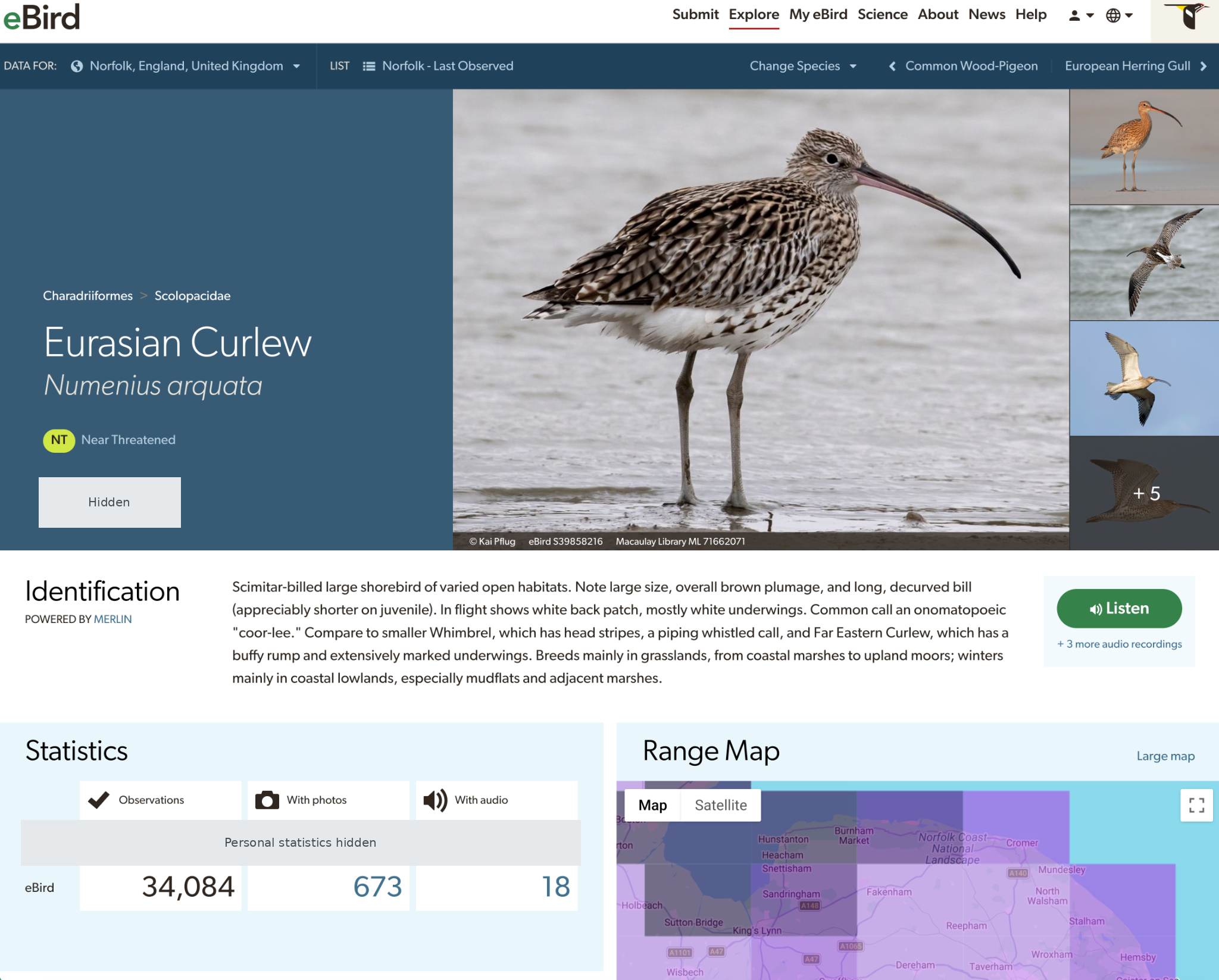
The Curlew species page includes identification information, regional records and a range map.
Following seasonal arrivals
On the Norfolk overview from 29 September, Redwing and Brambling appear in September’s “New Species” panel. Nearby, “Community Targets” lists species reported around this time in previous years but not yet recorded for the current month in the regional display. These targets concern the county’s records, rather than birds missing from your own list. [4]
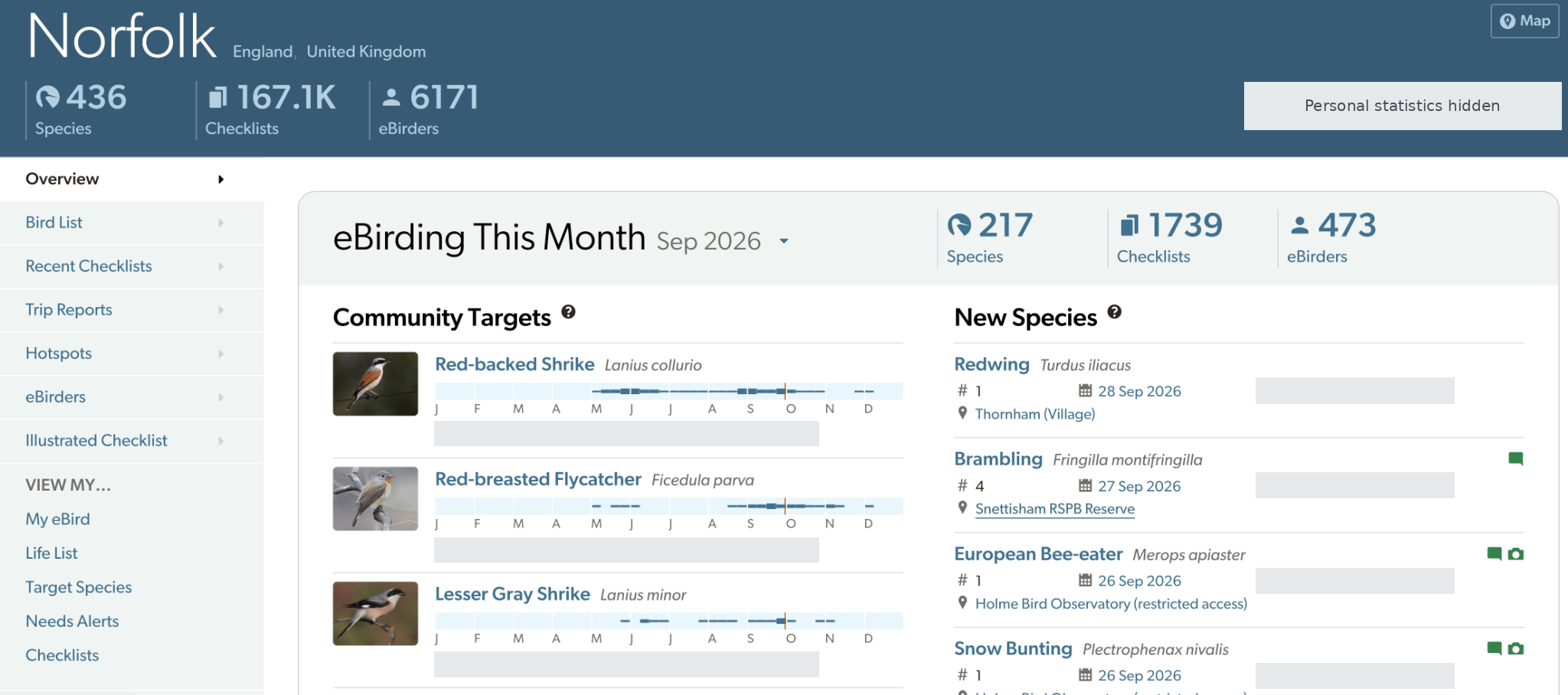
Norfolk’s September 2026 overview, showing Community Targets and newly reported species for the month.
Recent sightings and historical bar charts help put these reports in context. Neither follows the movements of individual birds, and both differ from modelled work such as eBird Status and Trends. Our month-by-month migration guide gives the wider British seasonal picture.
Targets and Alerts
Targets help you plan what to look for on a visit. Alerts tell you about birds recently reported. You can choose several options, depending on whether you want to find birds missing from your own list or follow unusual sightings. [6]
Targets: Species missing from your selected list, ranked by reporting frequency for the chosen region and months.
Needs Alerts: Recent reports of birds missing from your eBird list for that region.
Year Needs: Recent reports of birds missing from your regional list for the current year.
Rare Bird AlertsReports flagged as unusual for the place and date, regardless of whether you’ve seen the species.
Alert emails can arrive hourly or daily and can include records that haven’t yet been reviewed. Even a “Confirmed” report only means the record has been accepted. Before travelling, check when the bird was seen and whether there have been further reports. [6]
eBird and British recording
BirdTrack also keeps personal records and supports research and conservation, with a particular focus on Britain and Ireland. County clubs and recorders have their own submission arrangements. If you want your sightings included in a county report, check what the recorder accepts. [7]
Our birdwatching Resources directory links to recording schemes, reserve reports and bird-news services. A local report may add useful detail about where a bird is feeding or whether it has been seen again.
Some records need more care before sharing. eBird restricts public information for species on its Sensitive Species list, while retaining the records for authorised scientific use. A vulnerable breeding site may still need protection even if the species isn’t on that list. The eBird guidance on sensitive records explains when delaying or hiding a checklist may be appropriate. [8]
Sources and further reading
Information checked 29 September 2026. This guide draws on the author’s birding records and Cornell’s documentation; it is not a comparative test of every feature.